
New Trump Accounts for Kids: What Tax Preparers Need to Know About Form 4547 (2025-2026)
The One Big Beautiful Bill Act (signed July 2025) introduced Trump Accounts – a new tax-advantaged savings account for children under 18. Think of them as a hybrid between a traditional IRA and a 529 plan, with a one-time $1,000 federal seed deposit for eligible newborns.
As tax season approaches, many of your clients (especially new parents) will ask about opening one and claiming the free $1,000. Here’s a quick guide to help you assist them with Form 4547 (Election to Establish a Trump Account).
Who Qualifies for the $1,000 Seed Money?
Only children born January 1, 2025 – December 31, 2028 get the $1,000 pilot deposit from the U.S. Treasury. Requirements:
- U.S. citizen
- Valid Social Security Number (SSN)
- Trump Account must be elected (via Form 4547) before the child turns 18
Children born outside this window can still have a Trump Account opened, but they won’t receive the $1,000 seed.
Correct Order: File Form 4547 First – Then Open the Account
- File Form 4547 first (the election form)
- This is what officially creates the Trump Account with the IRS and Treasury.
- Submit it electronically through the IRS online portal (available early 2026) or mail it
- The Form can also be submitted electronically along with your 2025 tax return. See Details below on completing the Form within Taxware.
- Include the child’s name, SSN, date of birth, and the chosen custodian’s name/EIN (you can name the custodian at this stage even if you haven’t formally opened the account yet).
- IRS/Treasury processes the election
- Once accepted, the account is established in the system.
- Activate/complete setup with the custodian
- After July 4, 2026 (or when the IRS issues instructions), you (or the authorized individual) will finalize the account with a participating trustee/custodian (Vanguard, Fidelity, Schwab, etc.).
- This is when contributions (including the $1,000 seed for qualifying newborns) can actually begin.
Filing the 4547 with the individual tax return:
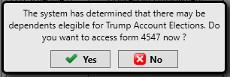
The program will show the following prompt if you have a dependent under the age of 18 with a valid SSN.
If you answer Yes, you will be taken to the following Menu.
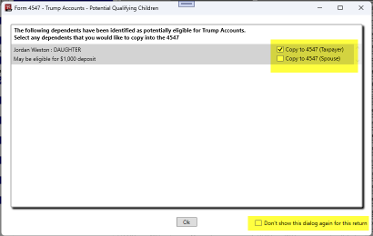
Check the box on the right to indicate which Child you want to add to the 4547 form and indicate whether the Taxpayer or Spouse will be the responsible party.
If you no longer want to be prompted for the 4547, then check the box “Don’t show this dialog again for this return” located at the bottom right of the menu.
If you check the box to “Copy to 4547”, then you will be taken to the following Menu.
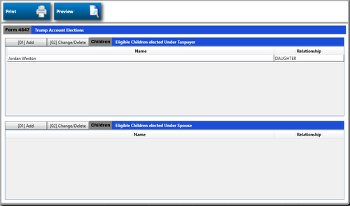
You can then finalize the 4547 by Double Clicking on the Dependent Name.
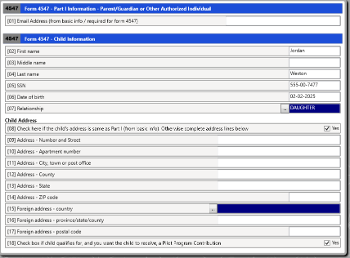
Note: County name on the Basic Information and an E-mail address is required when filing the 4547.
If you want to return to the 4547 form, you can access it from the bottom of the “Forms and Schedules” Menu. Option [94] “Form 4547.” Or it can also be accessed from the Basic Information menu in the dependent section.




